> Complete documentation index: [llms.txt](/llms.txt). Markdown versions of all pages are available by appending `.md` to page URLs.
# 1-WIRE
> Use the 1-Wire command panel in Mission Control 2 with a Binho Nova: panel settings and how to run 1-Wire transactions.
:::caution
**Mission Control 2: legacy, for the Binho Nova.** For the Binho Supernova, the Binho Pulsar and the Binho Atira, use [Mission Control 3](/software/legacy/mission-control-2/).
:::
1-Wire is a half-duplex protocol that uses one data line plus a ground reference. It is asynchronous: specific timings tell the commands apart. Like I2C, it is open-drain at the hardware level.
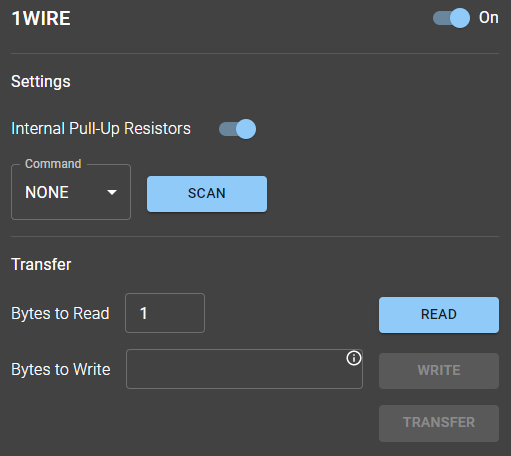
1-Wire command panel
## Settings
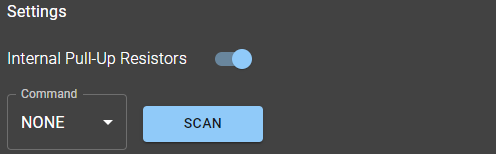
Settings sub-panel
Within this segment, users can opt to use internal pull-up resistors if available in the host adapter. Accessing the Command dropdown menu reveals available ROM Commands: SKIP and SELECT (often referred to as MATCH). The SKIP command broadcasts a message to all connected target devices, while the SELECT command communicates with a specific device. If there's only one target device on the 1-Wire bus, these commands are disregarded. The SCAN button initiates a series of SEARCH commands, unveiling the 64-bit addresses of all target devices connected to the bus.
## Transfer
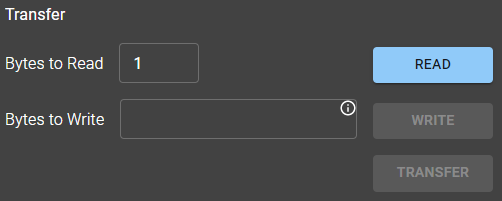
Transfer sub-panel
This segment features two inputs: 'Bytes to Read' and 'Bytes to Write'. It also includes three action buttons: READ, WRITE, and TRANSFER. As with other protocols, the 'Bytes to Write' field recognizes bytes in hexadecimal format. Activating the TRANSFER button initiates a Write action, immediately followed by a Read action.